


If you self-host anything behind a Cloudflare Tunnel, you’ve seen the logs. The moment a hostname goes public, the bots show up: probes for /wp-admin, requests for .env files, /cgi-bin/ shell attempts, .git directory scraping. None of it is aimed at you specifically — it’s the internet’s background radiation, automated scanners sweeping every IP they can reach. Most of it bounces off a 404, but it’s noisy, it wastes cycles, and occasionally one of those probes finds something you forgot to lock down.
I wanted a small, dumb gate that sits right at the mouth of my tunnel and slams the door on anyone who reaches for a doorknob that shouldn’t exist. So I built Thorngate.
Updated September 2026 for v0.12.0. Thorngate now keeps weeks of searchable request history on disk, ships a rebuilt admin portal with IP search and one-click bans, bans IPv6 scanners by their whole /64, escalates repeat offenders to permanent bans, reloads its config live, and exposes Prometheus metrics. This post has been rewritten to cover all of it.
What is Thorngate?
Thorngate is a tiny, zero-dependency, open-source Go reverse-proxy WAF (Web Application Firewall) that sits behind a Cloudflare Tunnel and in front of your web and API services. Think of it as a gate at the mouth of the tunnel that snags intruders before they ever reach your apps.
The idea is deliberately simple. Thorngate reverse-proxies all of your traffic to a default upstream — a Kubernetes service, a raw IP, whatever you point it at — with optional per-hostname overrides. But it also treats a list of configured patterns as honeypots. Any external IP that reaches for one of those patterns is instantly and permanently blacklisted, and from then on Thorngate stops answering it at all. The blacklist is persisted to disk, so it survives restarts.
A scanner that asks for /wp-admin on a site that has never run WordPress has told you everything you need to know about its intentions. So Thorngate stops talking to it. Forever.
The proxy itself is roughly 4,800 lines of Go (plus about 2,500 lines of tests), built entirely on the standard library — no external modules, no supply chain to worry about, and go build works completely offline. The admin portal is a small React app that’s compiled ahead of time and embedded into the binary, so there’s still exactly one file to deploy.
Where it fits
The request path looks like this:
Internet
  → Cloudflare
    → cloudflared (tunnel)
      → thorngate (WAF)
        → your app(s)
And the logic each request runs through is just four steps:
- Read the client IP from the
Cf-Connecting-Ipheader. - If that IP (or a range containing it) is blacklisted → deny it, with no upstream contact.
- If the path matches a honeypot → blacklist the IP, persist it, deny it.
- Otherwise, proxy to the route whose hostname matches, or to the default upstream.
That’s the entire mental model. Everything else — temp-bans, request history, the admin portal — is optional sugar layered on top of those four steps.
The one security assumption
Thorngate trusts the Cf-Connecting-Ip header to identify the real client. That trust is the load-bearing assumption of the whole design, and it only holds because the Thorngate Service is ClusterIP-only — reachable solely by the in-cluster cloudflared pod and never exposed directly. If you put Thorngate behind a LoadBalancer or Ingress, anyone could spoof that header and either dodge the blacklist or get someone else banned. Keep it internal and the assumption holds.
Honeypots: the core feature
Honeypots are the heart of Thorngate. You define a list of path patterns that no legitimate visitor would ever request, and anyone who does is blacklisted on the spot. There are five match modes so you can be as broad or as surgical as you like:
"honeypots": [
  "/wp-admin",                                            // prefix (boundary-aware)
  { "pattern": ".php",        "match": "contains" },      // anywhere in the path
  { "pattern": ".env",        "match": "suffix"   },      // ends with
  { "pattern": "/cgi-bin/*",  "match": "glob"     },      // shell-style glob
  { "pattern": "\\.(git|svn|hg)(/|$)", "match": "regex" } // full Go regexp
]
A few details I care about:
- Prefix matching is boundary-aware.
/apimatches/apiand/api/users, but it does not match/apixyz, so a legitimate route can’t get swept up because it happens to share a string prefix with a honeypot. - Matching ignores case and checks the cleaned path. Scanners love
/WP-Admin,//wp-admin,/x/../wp-adminand (for IIS backends) backslash variants, because your upstream will happily resolve all of them to/wp-admin. Thorngate resolves them the same way before matching. - It won’t let you shoot yourself in the foot. A honeypot that would match the site root — an empty pattern, a bare
/, a.*regex — is rejected at startup rather than banning every visitor on their first request.
The honeypot request itself is never proxied to your upstream — there’s no reason to bother your app with a request you’ve already decided to reject — so it never even shows up in your app’s logs.
Ghosting, not 403s
The original version answered blocked clients with a polite 403 Forbidden. That still tells a scanner “something is here, and it noticed you.” These days the default is meaner: a tarpit. Thorngate accepts the request and then simply never answers, holding the connection open until the client gives up or the tarpit timer runs out (100 seconds by default, roughly Cloudflare’s own origin timeout), then drops it. Every blocked request costs the scanner a stalled connection.
"block_action": "tarpit",     // or "drop" (close immediately) or "forbidden" (plain 403)
"tarpit_duration": "100s",
"tarpit_max": 512
tarpit_max caps how many connections can be held at once, so an attacker who notices the tarpit can’t turn it around and exhaust your file descriptors — past the cap, blocked requests are dropped instantly instead. Held connections are released the moment the server starts shutting down, so a deploy never waits on them.
IPv6: ban the whole /64
This one came straight out of my own logs. An IPv6 scanner hit a honeypot, got banned — and its very next request arrived from the same address with a different last digit. An IPv6 client almost always controls an entire /64 (that’s 2⁶⁴ addresses) and can hop between them at will, so banning the single address that tripped the wire achieves nothing.
So Thorngate now bans the client’s whole network. A honeypot hit from 2001:db8:bad:7::2 bans 2001:db8:bad:7::/64, and temp-ban strikes are counted per /64 as well, so a scanner rotating through its addresses adds up as one client instead of many polite ones.
"ipv6_ban_prefix": 64 // the default; 128 bans single addresses, 56 or 48 is more aggressive
IPv4 bans stay single-address. A whitelisted IPv6 client never gets its range banned on its own account, and it stays reachable even if its range gets banned because of someone else. Range bans are cheap, too: they’re grouped by prefix length, so checking an address costs one map lookup per prefix length no matter how many ranges are banned.
Temporary bans for the slow scanners
Not every bad actor trips a honeypot. Some just hammer your endpoints looking for weak spots, generating a stream of 401s and 404s. For those, Thorngate has an optional soft layer: temp-bans.
"temp_ban": {
  "enabled": true,
  "status_codes": [401, 403, 404, 429],
  "max": 20,
  "window": "1m",
  "ban_duration": "15m",
  "escalate_after": 3,
  "escalate_window": "24h"
}
That config says: if a single IP (or IPv6 /64) racks up 20 responses with those status codes inside a one-minute sliding window, ban it for 15 minutes. Expired bans are cleaned up on the IP’s next request and by a once-a-minute sweep, so they don’t linger in the blacklist.
The last two lines are new. Patient scanners learned to wait out a 15-minute ban and pick up where they left off, so escalation closes that loop: get temp-banned three times within 24 hours and the ban becomes permanent, recorded as a repeat-offender. Escalation is off by default; set escalate_after to turn it on.
Honeypots are the permanent hammer; temp-bans are the rate-limiter for the patient ones — and now the patient ones run out of patience before Thorngate does.
Forensics: request history on ban
When Thorngate blacklists an IP, it dumps that IP’s recent request history to the log so you can see exactly what the attacker was doing right before the door closed:
BLACKLISTED ip=9.9.9.9 honeypot=/wp-admin ua="curl/7.64.1" total=6
  history ip=9.9.9.9 reason=honeypot 1/3 method=GET host="app.example.com" path="/"          status=200
  history ip=9.9.9.9 reason=honeypot 2/3 method=GET host="app.example.com" path="/robots.txt" status=404
  history ip=9.9.9.9 reason=honeypot 3/3 method=GET host="app.example.com" path="/.env"       status=404
That log dump uses a small per-IP ring buffer, with a configurable depth, a cap on how many distinct IPs are tracked, and a TTL that drops idle entries. It’s there for live forensics in your log stream. For digging through what happened last week, there’s now a proper request history — keep reading.
The admin portal
This is the part that changed the most. The original dashboard was a single page of counters behind a pasted API token. It’s now a real admin portal: a React single-page app compiled ahead of time and embedded into the Go binary with go:embed, so there’s no CDN, no runtime Node, and still just one file to deploy. It runs on a separate port that you keep cluster-internal and reach with a port-forward.
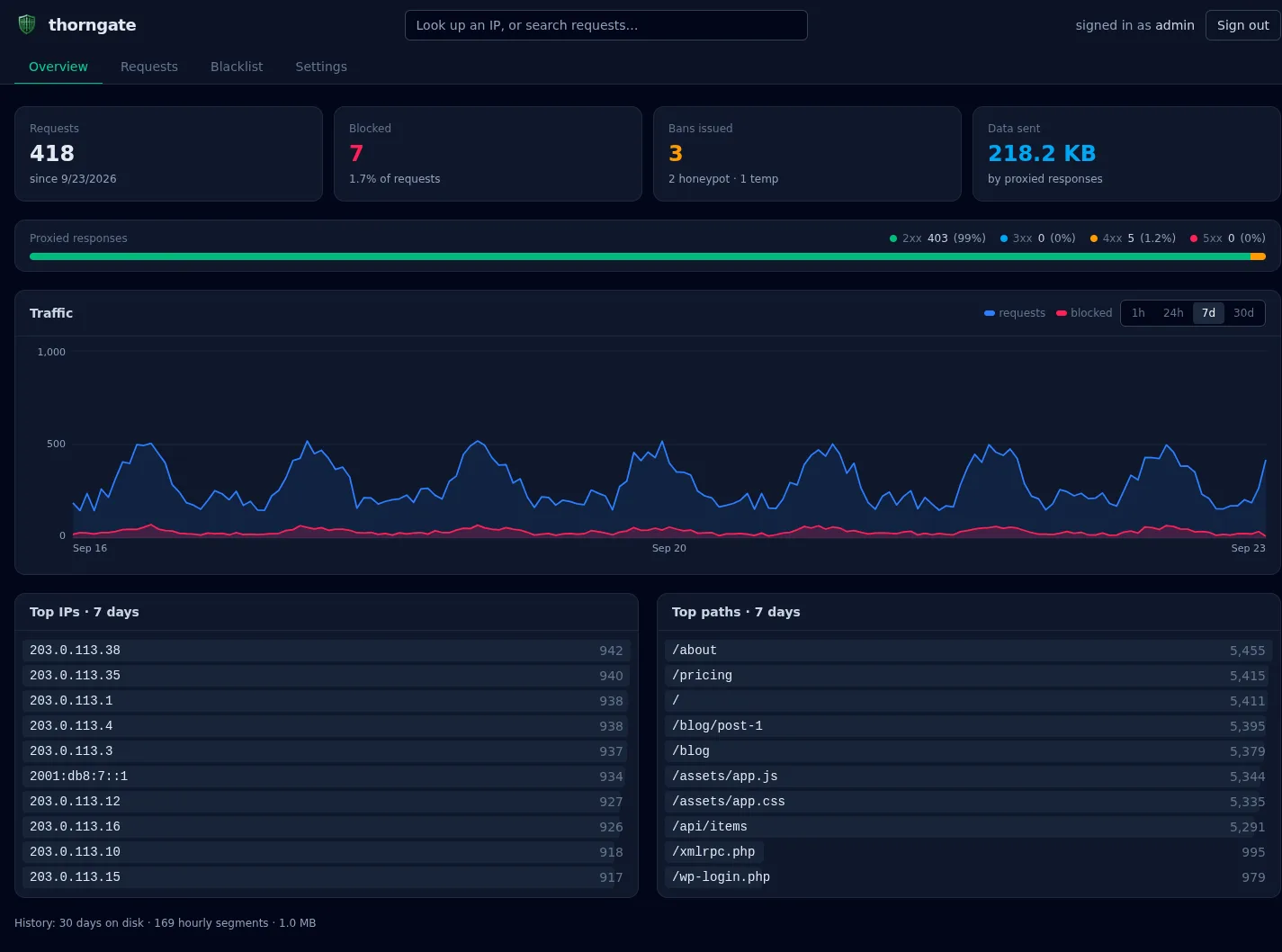
The Overview shows the headline numbers (requests, blocked, bans issued, data sent), a bar of proxied responses by status class, and a traffic chart. The chart shows the last hour minute by minute, or the last 24 hours, 7 days or 30 days by the hour; hover over it for exact counts. Underneath are the busiest IPs and paths for the same range. Click an IP to profile it, or click a path to search every request for it.
Searching requests
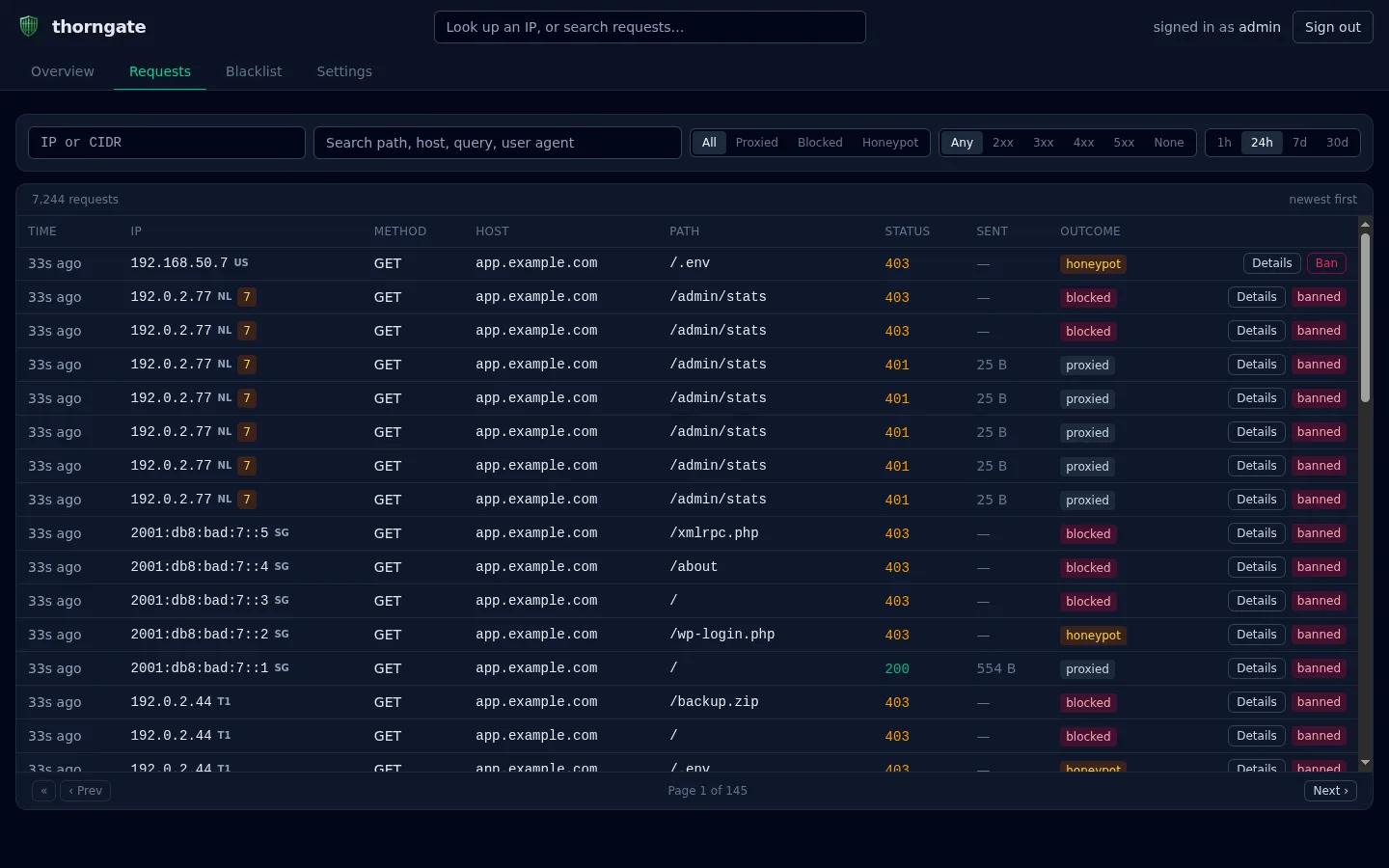
The Requests tab is the log I actually wanted when I was staring at raw pod logs. You can filter by a single IP or a CIDR range, by free text (matching the path, host, query string or user agent), by outcome, by status class and by time range. Each row shows the client’s country (from Cloudflare’s Cf-Ipcountry header), a request-count badge on chatty IPs, and a banned marker once an IP has been blocked. Only the first page refreshes live, so the rows don’t shift under you while you read older pages.
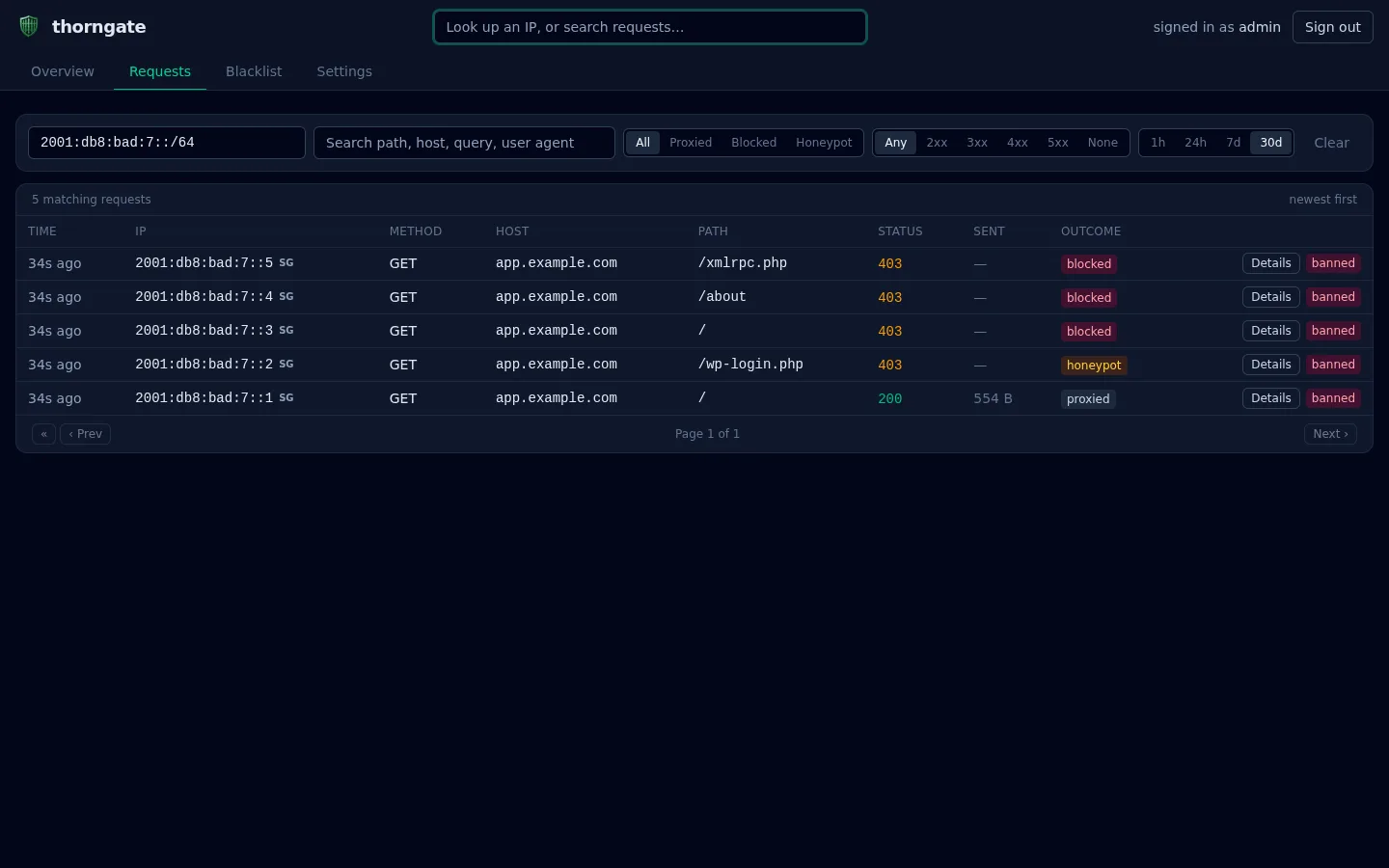
Filtering by range is where it earns its keep. Here’s that IPv6 scanner from earlier, filtered to its /64: five different addresses, one request each. The first / got through, the /wp-login.php probe tripped the honeypot, and everything after it was denied.
Profiling an IP
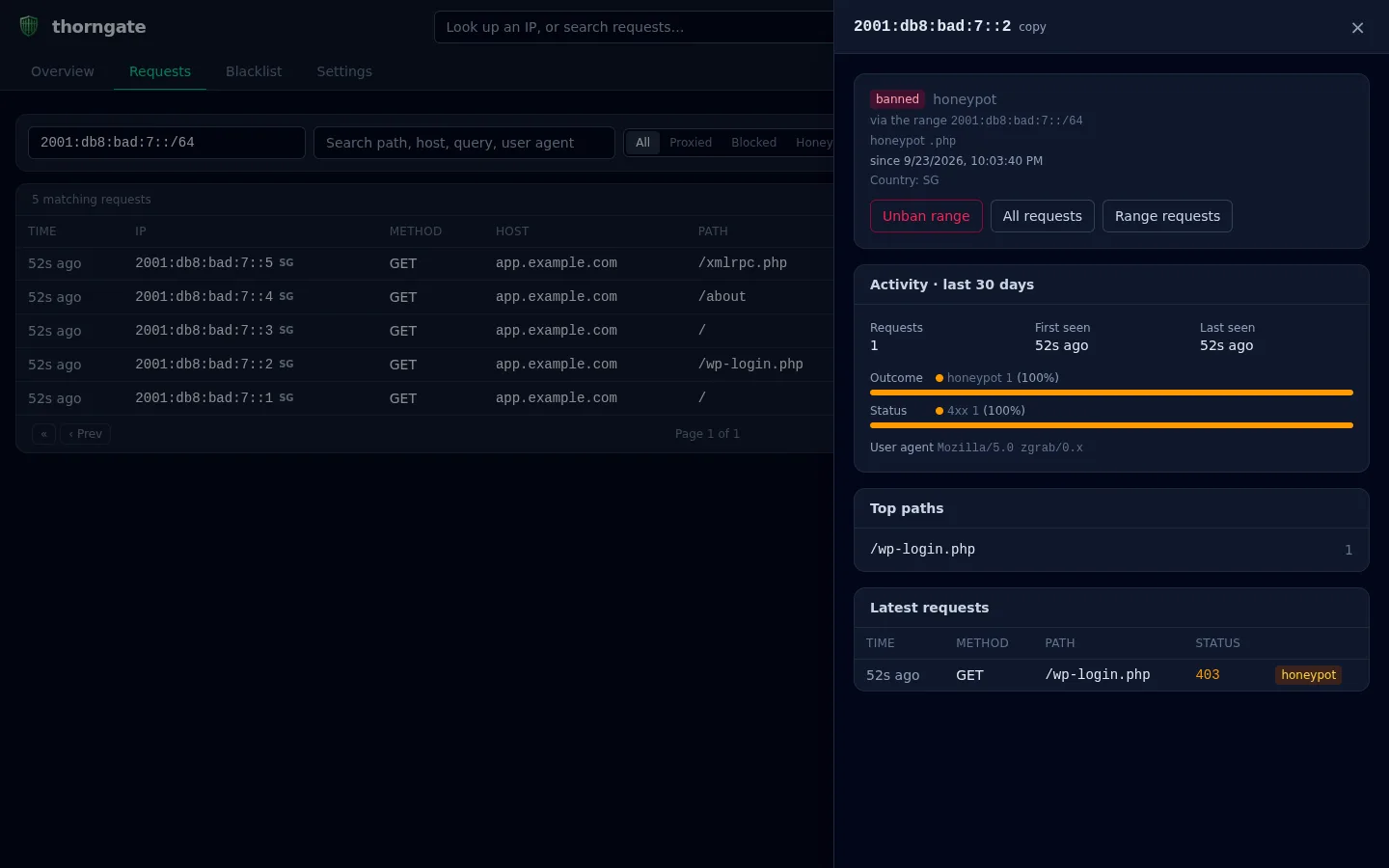
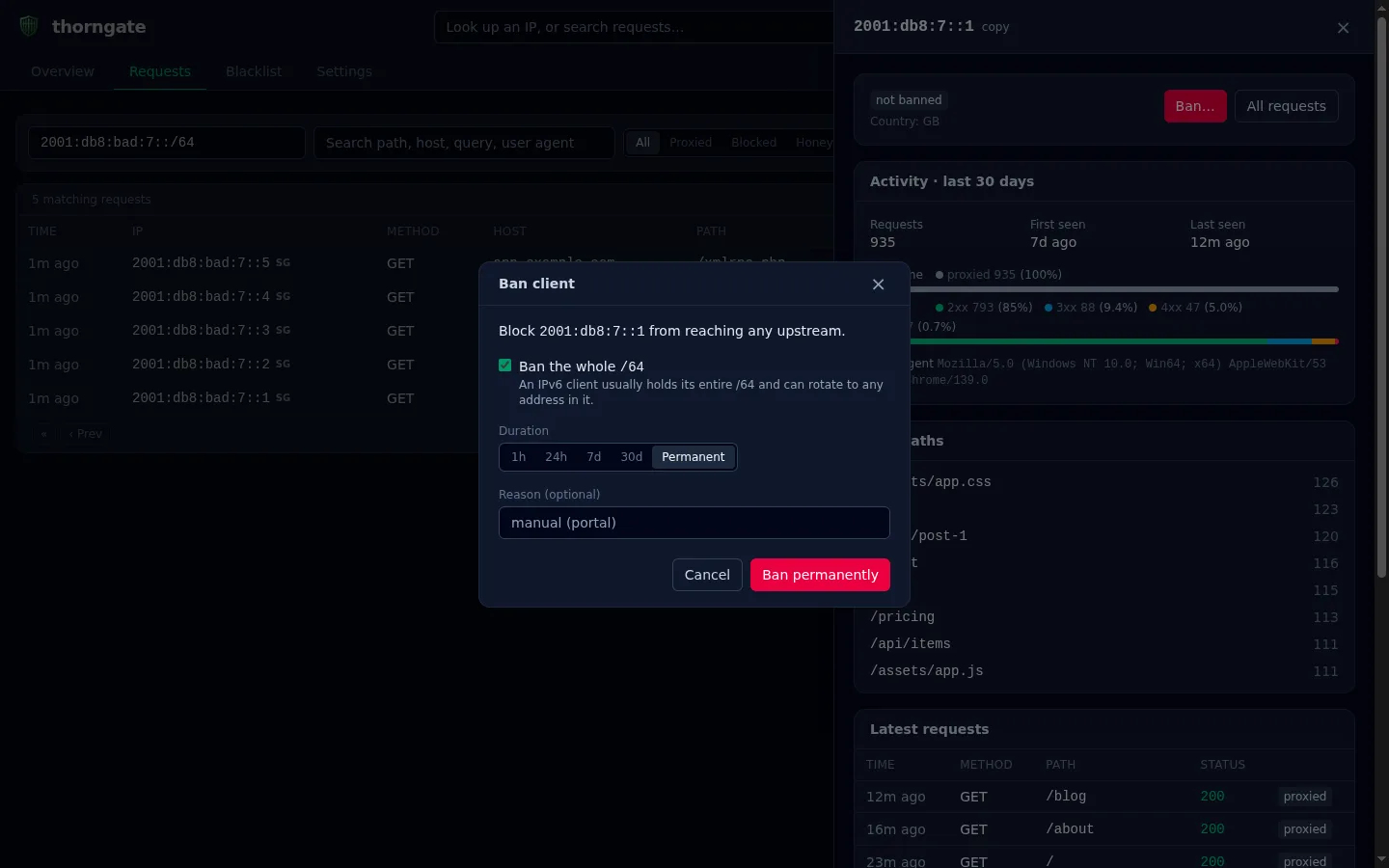
Click any IP anywhere in the portal, or type one into the search box in the header, and a panel slides out with everything Thorngate knows about it:
- whether it’s banned or whitelisted, including when it’s covered by a range ban and which honeypot caught it
- first and last seen
- outcome and status breakdowns
- its most-requested paths and user agent
- its latest requests
From there it’s one click to unban it, to see all of its requests, or to see every request from its whole range.
Banning opens a small dialog where you pick a duration — 1 hour, 24 hours, 7 days, 30 days or permanent — and an optional reason. For an IPv6 address it offers to ban the whole /64, checked by default.
Managing the blacklist
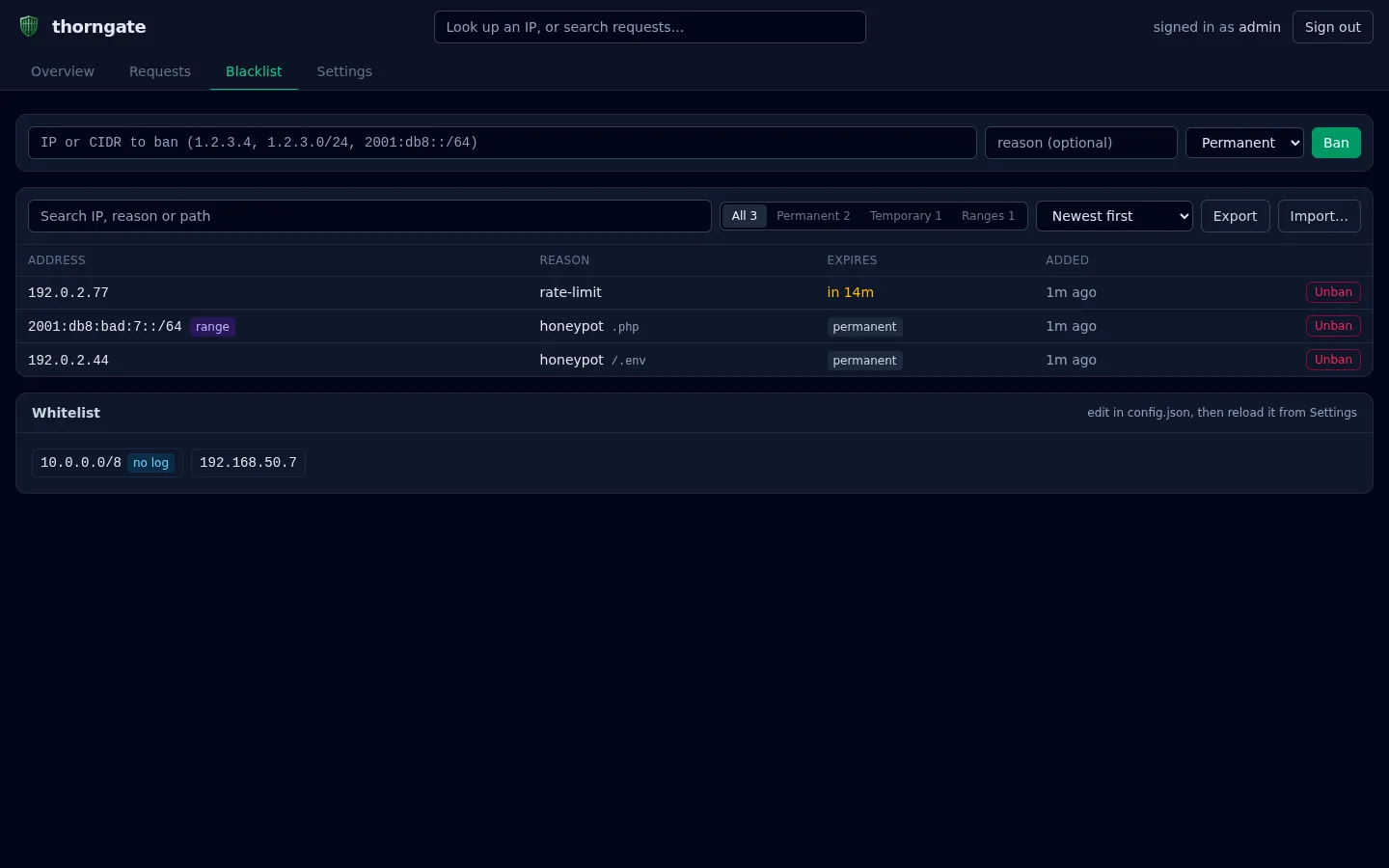
The Blacklist tab lists every active ban. You can search it, filter it to permanent bans, temporary bans or ranges, and sort it (including by which temporary bans expire soonest). Unbans ask for confirmation, and temporary bans show a live “expires in 12m” countdown.
There’s also export and import. Export downloads the whole blacklist as JSON. Import takes either a Thorngate export or any plain one-IP-per-line blocklist, which is the format most public blocklists use, and adds everything in a single disk write. Below the table is a read-only view of your whitelist, so you can see at a glance who’s exempt.
Locked down by default
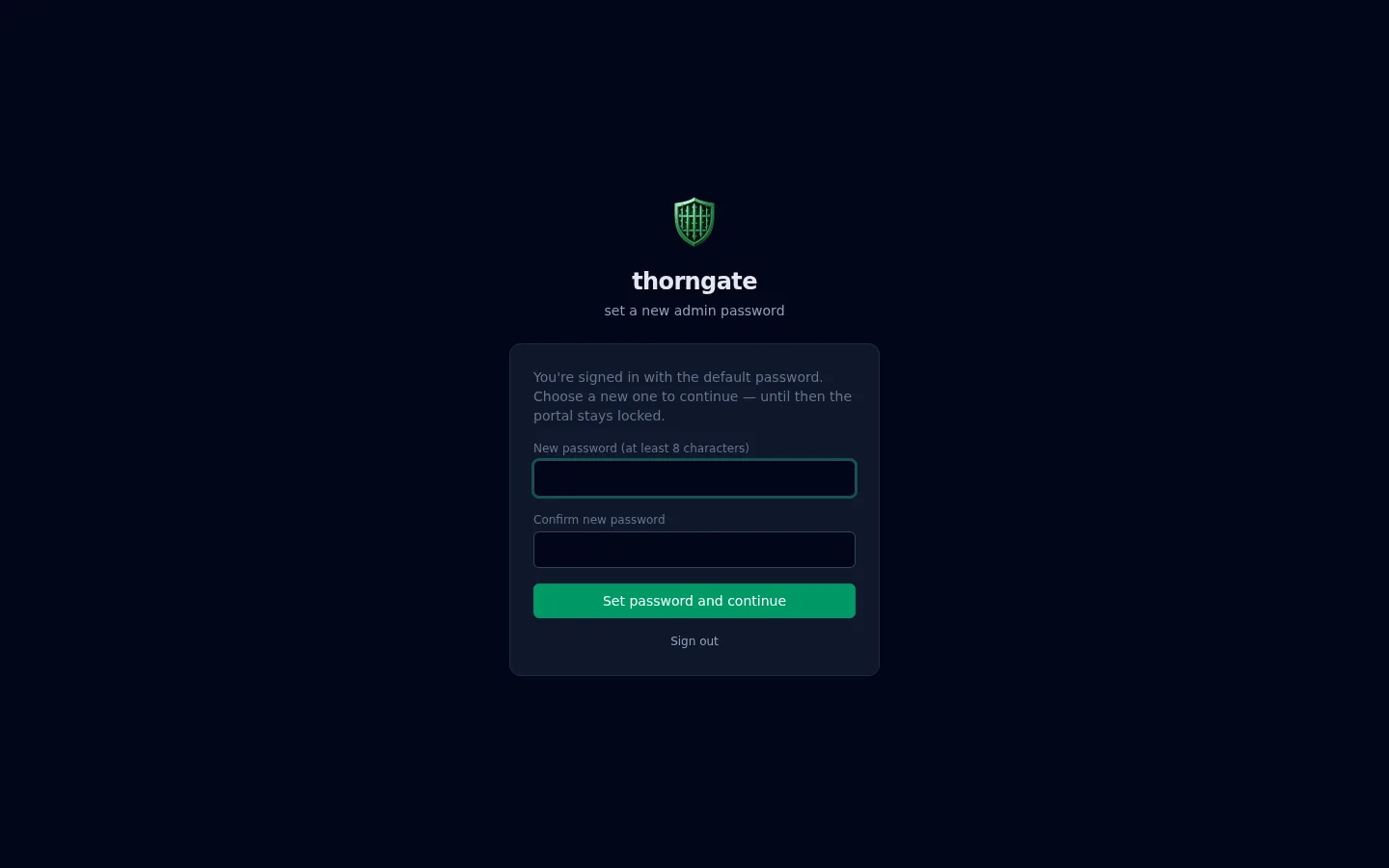
The portal uses a username and password, not a pasted token. A fresh install signs in with admin / admin, but until you change that password the portal is locked to a single set-a-new-password screen, and the API refuses everything else. That also applies to older installs that never got around to changing it.
Passwords are stored as salted PBKDF2-HMAC-SHA256 hashes, implemented on the standard library to keep the zero-dependency promise. After five failed logins, sign-in is refused for 30 seconds, and the wait doubles with each further failure up to 15 minutes. Changing your password signs out every other session. For scripts there’s still an optional static API token, which can come from the THORNGATE_ADMIN_TOKEN environment variable (a Kubernetes Secret in practice):
# sign in (or set TOKEN to your static API token)
TOKEN=$(curl -s -d '{"username":"admin","password":"your-password"}' localhost:9000/admin/login \
  | sed 's/.*"token":"\([^"]*\)".*/\1/')

# block an IP permanently, or a whole range for a week
curl -H "Authorization: Bearer $TOKEN" -d '{"ip":"1.2.3.4"}' localhost:9000/admin/blacklist
curl -H "Authorization: Bearer $TOKEN" -d '{"ip":"1.2.3.0/24","duration":"7d"}' localhost:9000/admin/blacklist

# import a public blocklist, then search a range's history
curl -H "Authorization: Bearer $TOKEN" --data-binary @blocklist.txt localhost:9000/admin/blacklist/import
curl -H "Authorization: Bearer $TOKEN" "localhost:9000/admin/requests?ip=2001:db8:bad:7::/64&range=7d"

# pardon an IP
curl -H "Authorization: Bearer $TOKEN" -X DELETE localhost:9000/admin/blacklist/1.2.3.4
Weeks of history without a database
The dashboard used to show only what fit in memory: the last few thousand requests. That’s fine for “what’s happening right now,” but useless for “did this IP poke at us last Tuesday?” I didn’t want to bolt a database onto a zero-dependency proxy, so the history lives in plain files:
"stats": {
  "archive": { "dir": "/data/requests", "retention_days": 30 }
}
Every request is appended as one JSON line to the current hour’s file. When the hour closes, that file is gzipped (JSON compresses roughly 8–10×) and a small index is written next to it, with request totals plus per-IP and per-path counts. Hours older than the retention period are deleted.
/data/requests/
  2026-09-23T14.jsonl      ← current hour, appended live
  2026-09-23T13.jsonl.gz   ← sealed hour
  2026-09-23T13.idx.json   ← its index
The indexes are what make it fast. Looking up an IP reads the small index files and only opens the hours that IP actually appears in, so a scanner seen once last week costs one file read, not a scan of 30 days. The top-IP lists and the long-range traffic chart come straight from the indexes without touching a single event.
A few guarantees I cared about:
- The proxy never waits on the disk. Requests are handed to a single background writer through a queue. If the writer ever falls behind, events are dropped and counted rather than slowing down traffic.
- A crash can’t lose a sealed hour. Sealing writes to temporary files and renames them into place, so an interrupted seal is simply redone at the next start. A half-written last line is skipped.
- It’s small. An event is about 25 bytes once gzipped. A million requests a day comes to about 25 MB a day, and a typical homelab stays at a few MB for the whole month.
Metrics and live reload
Two operational features rounded out this release:
- Prometheus metrics.
/metricson the admin port exposes the counters: requests, blocked requests, honeypot bans, temp-bans, escalations, responses by status class, bytes sent, blacklist size, connections currently held in the tarpit, and archive size and drops. It needs no login, because scrapers rarely carry credentials and it only exposes counters. You can switch it off in the config. - Live config reload. Send
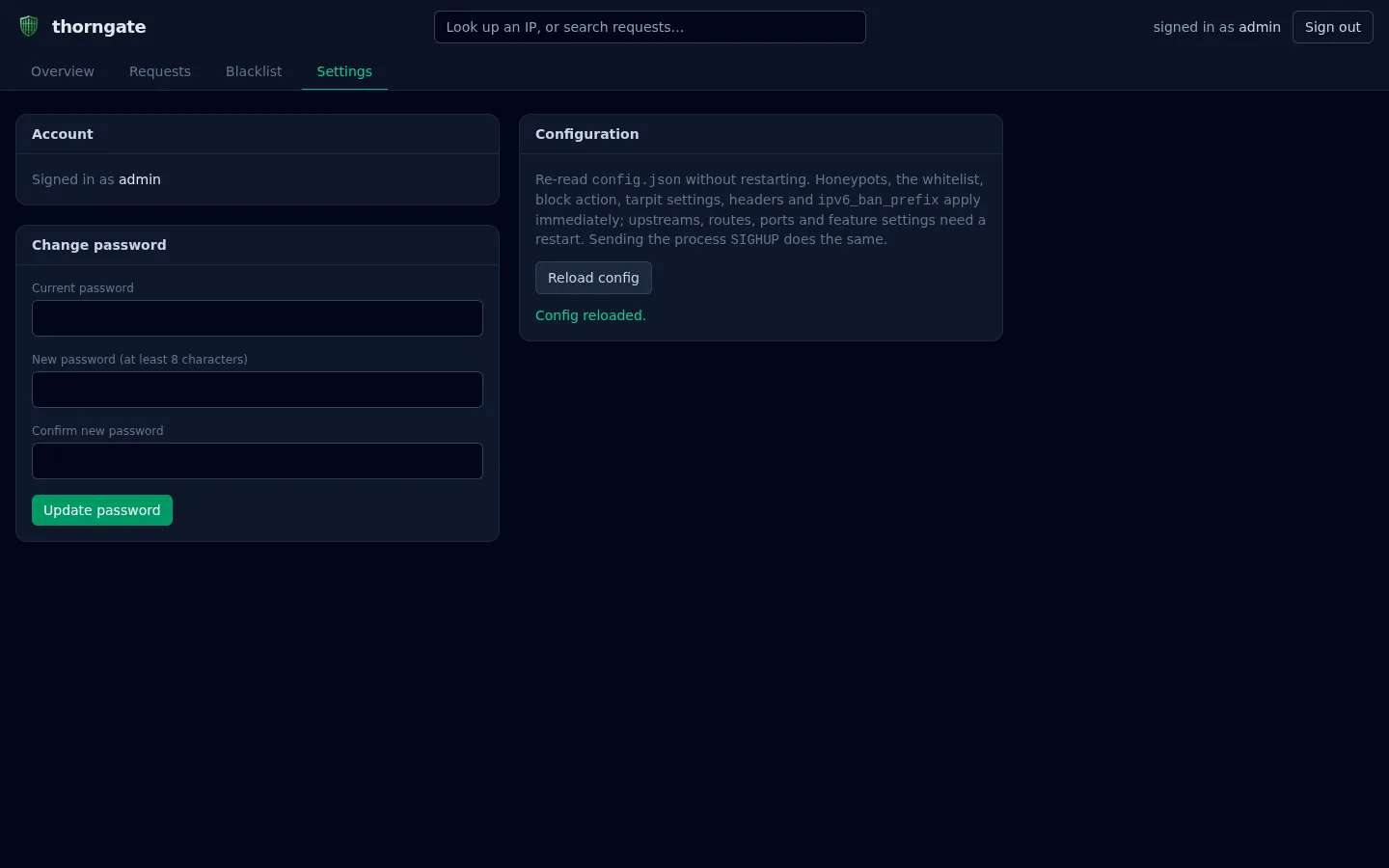
SIGHUP, press Reload config in Settings, orPOST /admin/reload. Honeypots, the whitelist, the block action and tarpit settings, the header names and the IPv6 prefix all apply immediately without dropping a connection. Anything that genuinely needs a restart (ports, upstreams, routes) is reported back to you instead of being silently ignored. A config that fails to load is rejected, and the running one stays in place.
Config parsing is now strict too. A typo like "tempban" used to be silently ignored, quietly leaving a protection switched off. Now it’s an error at startup, which for a security tool is the behaviour you want.
Routing and protocol upgrades
Thorngate isn’t just a single-app gate. It has a default upstream for everything, plus optional hostname-based overrides with wildcard support:
"upstream": "10.0.0.10:8080",
"routes": [
  { "host": "api.example.com",            "upstream": "10.0.0.5:3000" },
  { "host": "*.internal.example.com",     "upstream": "10.0.0.6:9000" }
]
A *.example.com wildcard matches a.example.com and a.b.example.com, but deliberately not the bare apex example.com. And because plenty of real apps need WebSockets or SignalR, Thorngate transparently passes through protocol upgrades via Go’s http.Hijacker interface; upgraded connections are recorded as a 101 so they still show up in your stats. The request log records which upstream each request went to, which makes it easy to spot a hostname that isn’t matching its route.
Running it
The fastest way to try it is the published container image. Thorngate ships as a multi-architecture (amd64 + arm64) distroless image on GitHub Container Registry:
docker run -p 8765:8765 -p 9000:9000 \
  -v /path/to/config.json:/etc/thorngate/config.json \
  -v thorngate-data:/data \
  ghcr.io/timothydodd/thorngate:v0.12.0
The runtime image is gcr.io/distroless/static-debian12:nonroot — no shell, no package manager, running as a non-root user. The binary is built with CGO_ENABLED=0 and -ldflags="-s -w", so it’s a single static binary and the whole image is tiny.
If you’d rather build from source:
go build -o thorngate ./cmd/thorngate
./thorngate -config config.json   # proxy on :8765, admin portal on :9000 if enabled

# simulate a Cloudflare request tripping the ".php contains" honeypot.
# With the default tarpit, curl hangs until it gives up; set
# "block_action": "forbidden" in the config to see a 403 instead.
curl -m 5 -H "Cf-Connecting-Ip: 9.9.9.9" http://localhost:8765/x/shell.php   # IP now blocked
curl -m 5 -H "Cf-Connecting-Ip: 9.9.9.9" http://localhost:8765/             # ghosted forever

go test ./...
On Kubernetes
Since this is what I actually run it on, the repo ships a complete k3s manifest under deploy/k3s/. It sets up:
- a namespace
- a ConfigMap for the config
- a Secret for the optional API token
- a PersistentVolumeClaim, so the blacklist, credentials, stats and request history survive restarts (1Gi, which is plenty for a month of history)
- two ClusterIP Services, one for traffic and one for the admin portal
It’s frugal: 25m CPU and 32Mi RAM requested.
kubectl apply -f deploy/k3s/thorngate.yaml

# reach the portal without exposing it
kubectl -n thorngate port-forward svc/thorngate-admin 9000:9000
# then open http://localhost:9000/ and sign in (first time: admin / admin, then set a real password)
Your cloudflared ingress then points at Thorngate instead of directly at your app:
ingress:
  - hostname: example.com
    service: http://thorngate.thorngate.svc.cluster.local:80
  - service: http_status:404
A few design decisions I’m happy with
Zero dependencies, on purpose. The proxy is standard-library Go. There’s no go.sum full of transitive packages to audit, nothing to fetch, and the build works on a plane. The portal’s JavaScript is built once and committed, so even building the binary needs no Node. For a piece of security infrastructure, the smaller the trust surface the better.
Persistence that can’t eat your blacklist. The blacklist is written with the write-temp → fsync → rename dance, and writes are serialized so two bans landing at the same moment can’t corrupt the file or roll it back. If the file on disk is ever unreadable, Thorngate moves it aside and says so loudly instead of quietly starting empty and overwriting it.
Zero overhead when features are off. If you don’t enable temp-bans, request history or stats, Thorngate skips wrapping the response writer entirely and proxies straight through. You only pay for the inspection you actually asked for.
Whitelist always wins. A whitelisted IP is never blocked: not inside a banned range, and not even if it was banned before you whitelisted it. Whitelist your own admin IP and your internal ranges first thing, so you can’t lock yourself out.
Scaling
The default is a single replica, because the blacklist lives in memory and in a local file on a ReadWriteOnce volume, and the request history lives on that same volume. That’s plenty for a homelab or a small fleet of services behind one tunnel. If you ever needed several replicas, the blacklist package is deliberately small: swapping its file store for a shared backend like Redis (SET / SISMEMBER) is a contained change, and then every pod would see the same blocklist.
Get Thorngate
Thorngate is open source under the MIT license, so use it, fork it, and bend it to your setup. Grab the code, read the release notes, or pull the container:
- Source: github.com/timothydodd/thorngate
- Release notes: v0.12.0
- Container: ghcr.io/timothydodd/thorngate
If you’re running services behind a Cloudflare Tunnel and you’re tired of watching the scanner noise roll past in your logs, point them at a honeypot list and let the gate do the rest. Then open the portal and watch them walk into it.