


I recently set up a TShock-based Terraria server on my k3s cluster for the occasional play session with friends. It worked great — except for one thing: the Terraria dedicated server pegs a full CPU core and holds onto ~2 GB of RAM whether anyone is online or not. For a server that gets used a few hours a week, that’s a lot of wasted electricity.
So I built a small Go proxy that sits in front of the server and scales the pod down to zero when nobody’s connected. When someone tries to join, the proxy wakes it back up. Code and prebuilt image are public — anyone with a k3s cluster can drop it in.
How it works
The public LoadBalancer points at the proxy, not the Terraria server. Here’s the flow:
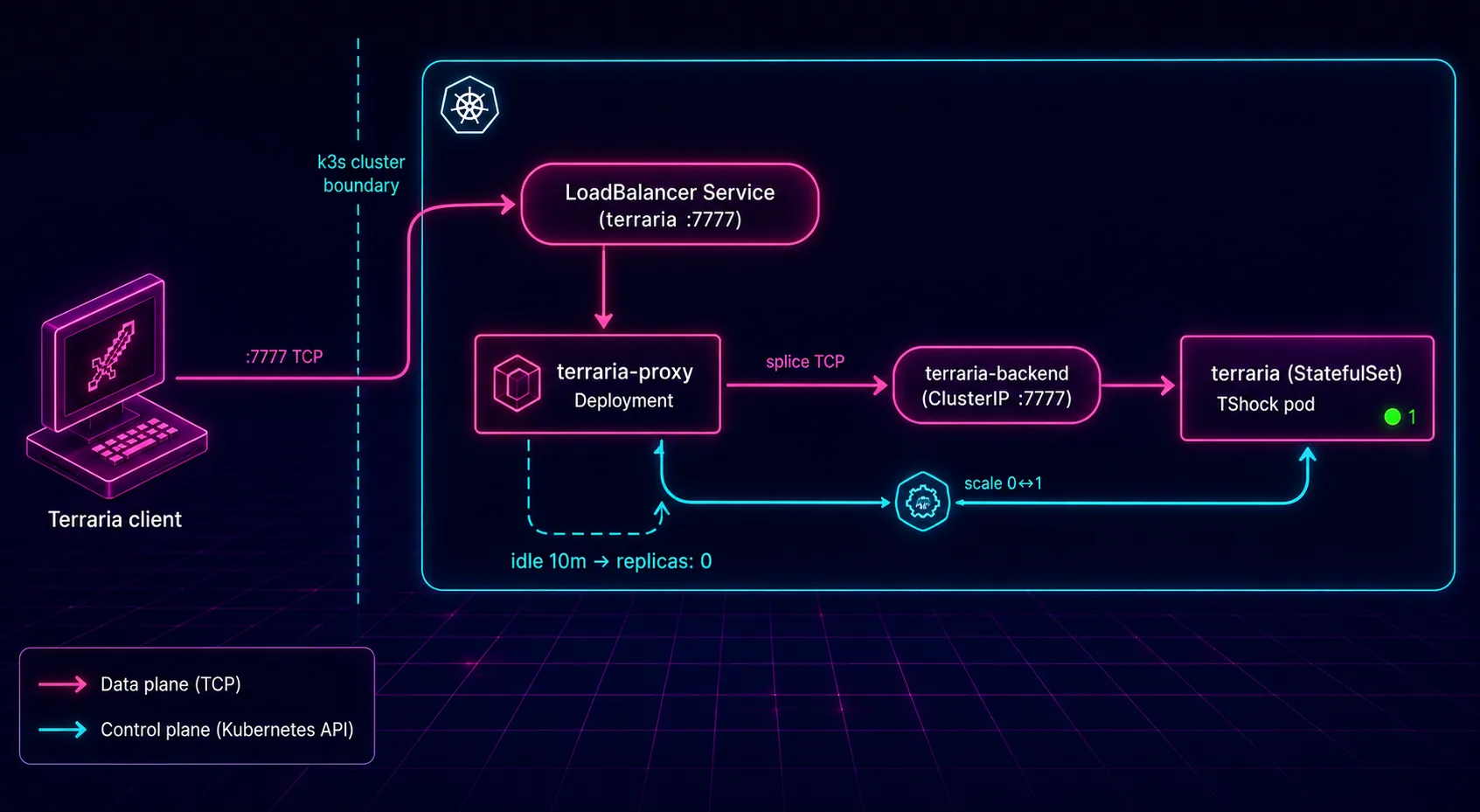
When a Terraria client connects:
- The proxy accepts the TCP connection.
- If the server is scaled to zero, it bumps the StatefulSet to
replicas: 1. - It waits for TShock to bind port
7777, then splices the connection through. - While at least one client is connected, the server stays up. Once everyone disconnects and the idle window elapses, the proxy scales back to zero.
No operators, no custom resources — just the built-in Kubernetes scale subresource. The first connect after a long idle takes 10–30 seconds while the pod cold-starts; Terraria’s client timeout is generous enough to handle it.
Running it on your own cluster
You’ll need a k3s (or any Kubernetes) cluster with a working LoadBalancer — MetalLB works fine if you’re on bare metal. If you don’t have a cluster yet, I wrote a walkthrough on building one from cheap hardware here: Beginner’s Guide: Setup a Kubernetes Cluster. Once you’ve got a cluster:
git clone https://github.com/timothydodd/lazy-terraria.git
cd lazy-terraria
kubectl apply -f k3s/
That applies everything in one shot: namespace, PVCs, the TShock StatefulSet, the proxy Deployment, RBAC, and both services. Watch first-boot world generation:
kubectl -n terraria logs -f statefulset/terraria
Grab the external IP:
kubectl -n terraria get svc terraria
Point your Terraria client at that IP on port 7777 and you’re in.
Tuning
A few env vars on the terraria-proxy Deployment control the wake/sleep behaviour:
| Variable | Default | What it does |
|---|---|---|
IDLE_TIMEOUT |
10m |
How long the server stays up after everyone disconnects. |
WAKE_TIMEOUT |
120s |
Max time to wait for TShock to come up after a cold start. |
CHECK_INTERVAL |
30s |
How often the idle watcher runs. |
If your world is large and takes longer to load, bump WAKE_TIMEOUT. If you want the server to stay up longer between sessions, bump IDLE_TIMEOUT.
A couple of gotchas
- Any TCP connect wakes it. The proxy doesn’t parse the Terraria protocol, so a port scan or a misconfigured TCP health check will wake the server. On a friends-only setup this is fine — port scanners aren’t frequent enough to matter, and the idle timer catches them.
- First-time connection is slow. Cold-starts take 10–30 seconds. Tell your friends to retry once if their client times out the first time.
That’s the whole thing. If you run a Terraria server (or any TCP game server that idle-burns CPU) and don’t want it eating cycles 24/7, grab the repo and give it a try. The pattern works for anything that speaks plain TCP and tolerates a cold-start delay on the first packet.